Frigidaire Air Conditioner Remote Control Instructions: A Comprehensive Guide
Navigating Frigidaire AC remotes is now easier! This guide details functions, troubleshooting, and replacements – from basic operation to universal compatibility and backlit features.
Understanding Your Frigidaire Remote
Your Frigidaire air conditioner remote is the central command for comfortable climate control. It’s designed for intuitive operation, allowing you to adjust settings from across the room. However, understanding its layout and functions is key to maximizing its benefits. Most Frigidaire remotes feature clearly labeled buttons for power, temperature adjustment, fan speed, and mode selection (Cool, Fan, Dry, Auto).
Some models boast additional features like a timer, energy saver mode, and even backlit buttons for easier nighttime use. It’s crucial to identify your specific remote model number, as functionality can vary. Unlike universal remotes requiring complex programming, many Frigidaire replacements work straight out of the package, provided they visually match your original. Remember, this isn’t always a universal remote; direct compatibility is often prioritized. Familiarizing yourself with these aspects will ensure a seamless and efficient cooling experience.
Remote Control Model Numbers & Compatibility
Frigidaire utilizes various remote control model numbers, impacting compatibility with specific air conditioner units. Common numbers include 5304476851, CRA256ST213, CRA256ST214, and 5304520833. Identifying your AC’s compatible remote is vital for seamless operation. Replacements like the RG15E/E-ELL (also 5304477003) are designed for units with heating functions.
When seeking a replacement, prioritize visual similarity to your original remote. Amazon and Walmart offer options, but confirm compatibility with your Frigidaire model (e.g., FFRA062ZA1, FFRA0822U1, FFRA2922Q2). Direct compatibility is often advertised. Be cautious with “universal” remotes, as they require programming. OEM PartSelect replacements (like 5304520833) guarantee fit. Always double-check the model numbers before purchasing to avoid frustration and ensure your remote functions correctly with your Frigidaire air conditioner.
Identifying Compatible Frigidaire Air Conditioner Models
Determining compatible Frigidaire AC models is crucial for a functioning remote. Look for model numbers like FFRA062ZA1, FFRA062ZA10, FFRA0822U1, FFRA0822U10, FFRA0822U1E, FFRA0822U1E0, FFRA082ZA1, FFRA082ZA10, FFRA1022U1, and FFRA1022U10. Also, check for FFRA2822R2, FFRA2822R21, FFRA2922Q2, FFRA2922Q20, and FFRA2922Q21.
Many replacement remotes explicitly list compatible models on Amazon and Walmart. If your AC isn’t listed, visual comparison is key – the replacement should closely resemble your original. For models like FFRE0533S1 or FFRE0833Q1, confirm compatibility before purchase. Using the correct remote ensures all functions, including cooling, fan speed, and timer settings, operate as intended. Incorrect remotes may lack full functionality or not work at all. Prioritize model-specific replacements for optimal performance and avoid the complexities of universal remote programming.
Basic Remote Control Functions
Frigidaire AC remotes offer intuitive control over your air conditioner. Core functions include power on/off, temperature adjustment, fan speed selection (low, medium, high, auto), and mode selection (cool, fan, dry, auto). Many remotes feature a timer function for scheduled operation, enhancing convenience and energy efficiency.
The remote’s layout typically includes dedicated buttons for each function, ensuring easy navigation. Some models, like those available on Amazon and PartSelect, boast backlit buttons for improved visibility in low-light conditions. Understanding these basic functions is the first step to maximizing your AC’s performance. Proper use allows you to customize your cooling experience, optimizing comfort and minimizing energy consumption. Regularly check battery levels to maintain consistent functionality.
Powering On/Off the Air Conditioner
The most fundamental function of your Frigidaire remote is powering the air conditioner on and off. Typically, a clearly marked “Power” button initiates this action. Ensure the remote is pointed directly at the AC unit’s receiver for a reliable signal. Some remotes, as discussed in Arduino forum posts regarding IR signals, rely on specific raw codes for activation, though most modern Frigidaire remotes operate with standard infrared signals.
If the AC doesn’t respond, first verify battery functionality. A weak signal can prevent the power command from reaching the unit. Replacement remotes from Amazon often work “straight out of the package” with fresh batteries. If using a universal remote, ensure it’s correctly programmed with the appropriate Frigidaire code. A successful power-on is indicated by the AC unit’s display illuminating and the fan initiating.
Adjusting Temperature Settings
Your Frigidaire remote allows precise temperature control for optimal comfort. Dedicated “Temperature Up” and “Temperature Down” buttons are standard, enabling adjustments in one-degree increments. The current set temperature is usually displayed on both the remote and the air conditioner unit itself. Remember that the displayed temperature is the set temperature, and the actual room temperature may vary.
Many Frigidaire models offer a wide temperature range, typically from 60°F to 80°F (16°C to 27°C). Utilizing the remote’s temperature controls in conjunction with the “Energy Saver” mode (discussed elsewhere) can help optimize energy consumption. Replacement remotes, readily available on Amazon and PartSelect, maintain this core functionality. Ensure clear line of sight between the remote and the AC unit for responsive temperature adjustments. Consistent use of these controls ensures a comfortable indoor climate.
Fan Speed Control
Frigidaire air conditioner remotes typically feature dedicated buttons for controlling fan speed. Common settings include “Low,” “Medium,” “High,” and “Auto.” Selecting “Auto” adjusts the fan speed based on the difference between the set temperature and the actual room temperature, optimizing both comfort and energy efficiency. Manual fan speed control allows for personalized airflow preferences.
Using higher fan speeds increases airflow but also consumes more energy. Lower speeds are quieter and more energy-efficient, ideal for maintaining a consistent temperature without excessive noise. Replacement remotes, sourced from retailers like Amazon, Walmart, and PartSelect, consistently include these fan speed controls. Ensure the remote has a clear signal path to the AC unit for reliable operation. Experiment with different fan speeds to find the optimal balance between comfort and energy savings.
Mode Selection (Cool, Fan, Dry, Auto)
Your Frigidaire remote offers several operating modes, each designed for specific cooling needs. “Cool” mode is the standard air conditioning function, actively lowering room temperature. “Fan” mode circulates air without cooling, useful for ventilation. “Dry” mode, or dehumidify, reduces humidity levels, creating a more comfortable environment, especially in damp climates. “Auto” mode intelligently switches between cooling and fan modes to maintain the set temperature efficiently.
Selecting the appropriate mode optimizes performance and energy consumption. Replacement remotes available on platforms like Amazon and Walmart faithfully replicate these mode selections. Understanding each mode’s function allows for tailored climate control. For example, using “Dry” mode can prevent mold growth. When purchasing a replacement, verify compatibility with your Frigidaire model to ensure all functions, including mode selection, operate correctly.
Setting the Timer Function
The timer function on your Frigidaire remote allows for automated operation, enhancing convenience and energy savings. You can typically set a timer to turn the air conditioner on or off after a specified period. This feature is ideal for pre-cooling a room before you arrive or automatically shutting off the unit while you sleep. The timer settings are usually adjusted using dedicated buttons on the remote, often labeled “Timer On” and “Timer Off.”
Programming the timer involves setting the desired delay time in hours. Replacement remotes, sourced from retailers like Amazon, PartSelect, and Walmart, generally maintain this functionality. Ensure the replacement remote is compatible with your specific Frigidaire model to guarantee accurate timer operation. Utilizing the timer function effectively minimizes energy waste and provides personalized comfort control, contributing to a more efficient cooling experience.

Replacing the Batteries
Maintaining your Frigidaire air conditioner remote requires periodic battery replacement to ensure consistent operation. When the remote’s response becomes sluggish or it stops functioning altogether, low batteries are often the culprit. Typically, these remotes utilize standard AAA or AA batteries, easily obtainable from most retailers. To access the battery compartment, locate the designated slot on the remote’s back or bottom, often secured with a sliding cover.
Carefully remove the old batteries, noting the correct polarity (+ and -) indicated inside the compartment. Insert new batteries, aligning them properly. Replacement remotes purchased from sources like Amazon, PartSelect, or Walmart will function immediately with fresh batteries – no programming needed! Always dispose of used batteries responsibly. Regular battery checks prevent interruptions to your cooling comfort and prolong the remote’s lifespan.
Troubleshooting Common Remote Issues
Encountering issues with your Frigidaire AC remote is common, but often easily resolved. If the remote isn’t working, begin with the simplest checks: ensure fresh batteries are correctly installed, verifying the polarity. Obstructions between the remote and the air conditioner’s sensor can also interfere with the signal; remove any objects blocking the path.
If problems persist, confirm the remote is compatible with your specific Frigidaire model. Non-universal replacement remotes, like those found on Amazon and Walmart, are designed for direct compatibility with listed models. For more complex issues, or if you’re attempting to use a universal remote, verifying the correct code is crucial. Online forums, like Arduino, sometimes offer raw codes for specific units, though this requires technical expertise. If all else fails, consider a direct OEM replacement from PartSelect.
Remote Not Working: Initial Checks
When your Frigidaire air conditioner remote stops responding, a systematic approach to troubleshooting is key. First, and most commonly, check the batteries. Replace them with fresh ones, ensuring correct polarity – a simple oversight can cause functionality loss. Next, visually inspect the remote for any physical damage, like cracks or button issues.
Ensure a clear line of sight between the remote and the air conditioner’s sensor. Obstructions, even seemingly minor ones, can block the infrared signal. Try moving closer to the unit. Confirm you’re pointing the remote directly at the AC’s sensor. If using a replacement remote, double-check it’s the correct model for your Frigidaire unit, as noted on Amazon and Walmart listings. Avoid assuming universal compatibility; specific models require specific remotes.
Programming a Replacement Remote (If Required)
While many Frigidaire replacement remotes, particularly those sourced from Amazon, are advertised as “plug and play” – functioning immediately after battery installation – some may require programming. This is especially true for universal remotes or certain direct replacements. The process typically involves entering a specific code corresponding to your Frigidaire AC model.
Finding the correct code can be challenging. Online resources and the remote’s manual are crucial. Websites often list codes for various brands, including Frigidaire. If your remote lacks auto-search functionality, you’ll need to manually input the code, following the remote’s instructions. Some remotes utilize a learning function, mimicking the signals from your original remote. If initial attempts fail, consult Frigidaire’s support documentation or consider a model specifically listed as directly compatible, like those available on PartSelect and Walmart, to avoid programming complexities.
Finding Remote Control Codes for Frigidaire

Locating the correct code is vital when programming a universal remote for your Frigidaire air conditioner. Numerous online databases compile remote codes for various brands, including Frigidaire. A starting point is searching for “Frigidaire remote codes” on the internet; several websites offer extensive lists categorized by model or function.
However, code lists can be extensive and require trial and error. The Arduino forum example highlights the complexity of raw code, suggesting a more straightforward code-based approach is preferable. When searching, have your Frigidaire AC’s model number readily available – it significantly narrows down the possibilities. If online searches prove unsuccessful, consult the universal remote’s manual; it often includes a dedicated section for Frigidaire codes. Remember that some newer Frigidaire models might not be listed in older code databases, necessitating further research or a direct-fit replacement.

Using a Universal Remote with Your Frigidaire AC
Employing a universal remote offers a cost-effective alternative to purchasing a genuine Frigidaire replacement. However, successful operation hinges on correct programming; Begin by identifying your Frigidaire AC’s model number, as this is crucial for finding the corresponding code. Most universal remotes require you to enter a code – either directly or through an auto-search function – to communicate with your AC unit.
While some remotes, as noted in Amazon listings, function immediately with batteries, many necessitate programming. Be aware that universal remotes can be more complex than direct replacements. If the auto-search fails, manually inputting codes from online databases is the next step. Remember, not all functions may be compatible. If you encounter issues, double-check the code and ensure the remote is pointed directly at the AC’s sensor. Consider a direct replacement if programming proves too challenging.
Specific Model Remote Features (e.g., Backlit Buttons)
Certain Frigidaire air conditioner remote control models boast enhanced features designed for user convenience. A prominent example, highlighted by PartSelect and Amazon listings, is the inclusion of backlit buttons. This feature significantly improves usability in low-light conditions, eliminating the need to fumble for the remote in the dark or strain to see the controls.
Beyond backlit buttons, some remotes may offer additional functionalities specific to certain AC units, such as dedicated ‘Energy Saver’ mode buttons or enhanced timer settings. Always refer to your specific model’s documentation to fully understand its capabilities. The presence of these features can greatly enhance the overall user experience, making temperature adjustments and mode selections simpler and more intuitive. Checking product descriptions on sites like Amazon can reveal if a particular replacement remote includes these desirable additions.
Understanding the ‘Energy Saver’ Mode
Frigidaire air conditioners often include an ‘Energy Saver’ mode, a feature designed to optimize power consumption while maintaining a comfortable room temperature. This mode typically works by slightly increasing the set temperature after the unit has been running for a period, preventing excessive cooling and reducing energy waste. While it may not provide the same level of precise temperature control as standard operation, it offers a practical solution for minimizing electricity bills.
The functionality of ‘Energy Saver’ mode can vary between models. Some remotes feature a dedicated button for quick activation, while others require navigating through the settings menu. Utilizing this mode is a simple yet effective way to contribute to energy conservation and lower your carbon footprint. It’s a beneficial option for periods when precise temperature control isn’t critical, such as overnight or when the room is unoccupied.
Where to Purchase Replacement Remotes
Finding a replacement Frigidaire air conditioner remote is thankfully straightforward, with several convenient options available to consumers. Amazon.com is a popular choice, offering a variety of replacements, often requiring no programming – simply insert batteries and use! They list specific model compatibility, like the FFRA062ZA1 and FFRA0822U1. Be mindful to confirm it’s a direct replacement, not a universal remote.

PartSelect.com provides OEM (Original Equipment Manufacturer) replacements, ensuring a perfect fit and functionality, using part numbers like 5304520833. Walmart.com also carries replacements, sometimes offering direct compatibility with models like those using RG15E/E-ELL units. When purchasing, always double-check the model number of your air conditioner to guarantee compatibility. Comparing prices and reading customer reviews can help you secure the best deal and a reliable remote.
Amazon Replacement Options
Amazon.com presents a diverse selection of Frigidaire air conditioner remote replacements, catering to various models and budgets. Many options boast a “plug-and-play” functionality, eliminating the need for complex programming – a significant advantage over universal remotes. Listings frequently specify compatibility with numerous Frigidaire models, such as the FFRA062ZA1, FFRA0822U1, and FFRA1022U1 series.
You’ll find replacements listed as direct substitutes, emphasizing the importance of visual similarity to your original remote. Some options, like those with backlit buttons (5304476851 CRA256ST213), enhance usability in low-light conditions. Prices vary, so comparing listings is crucial. Always verify the product description carefully to confirm compatibility with your specific Frigidaire AC unit before making a purchase. Customer reviews offer valuable insights into real-world performance and ease of use.

PartSelect OEM Replacements

PartSelect.com specializes in genuine Original Equipment Manufacturer (OEM) Frigidaire air conditioner remote controls, ensuring perfect compatibility and reliable performance. Their offerings, like Manufacturer Part Number 5304520833, are designed specifically for Frigidaire room air conditioners, providing seamless control over your unit’s climate settings.
Choosing an OEM replacement guarantees that all functions – temperature adjustment, fan speed, mode selection, and timer settings – will operate as intended. PartSelect emphasizes the intuitive design of these remotes, allowing for easy regulation of your space’s comfort. While potentially more expensive than aftermarket options, OEM parts offer the assurance of quality and longevity. The website provides detailed product information and compatibility checks to help you find the correct remote for your Frigidaire model, minimizing the risk of purchasing an incompatible part.
Walmart Replacement Options & Direct Compatibility

Walmart.com presents a range of replacement remotes for Frigidaire air conditioners, often emphasizing “direct compatibility” for simplified setup. Options like the RG15E/E-ELL Unit AC remote (5304477003) are specifically designed to work with Frigidaire units, including those with heating functions, eliminating the need for complex programming.
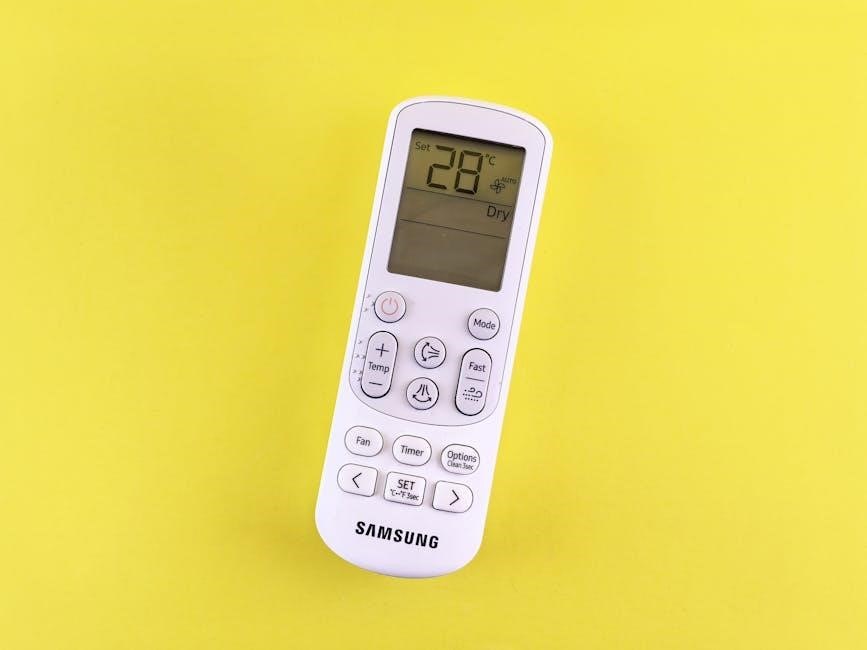
These replacements aim to function immediately after battery installation, offering a user-friendly alternative to universal remotes. Walmart’s listings frequently highlight compatibility with multiple Frigidaire models, making selection easier. However, verifying your specific model number against the product description is crucial. While generally more affordable, these replacements may vary in build quality compared to OEM parts. Carefully review customer reviews to assess reliability and functionality before purchasing. Direct compatibility promises a hassle-free experience, but confirming the match is key.